
TL;DR | Estimated Reading Time: 12 Min
This guide reviews seven leading brand management platforms, highlighting core features, pricing, and practical workflows for teams to improve brand consistency and efficiency.

Field Notes & Insights
By David Cox
Owner, 4Adventure Media
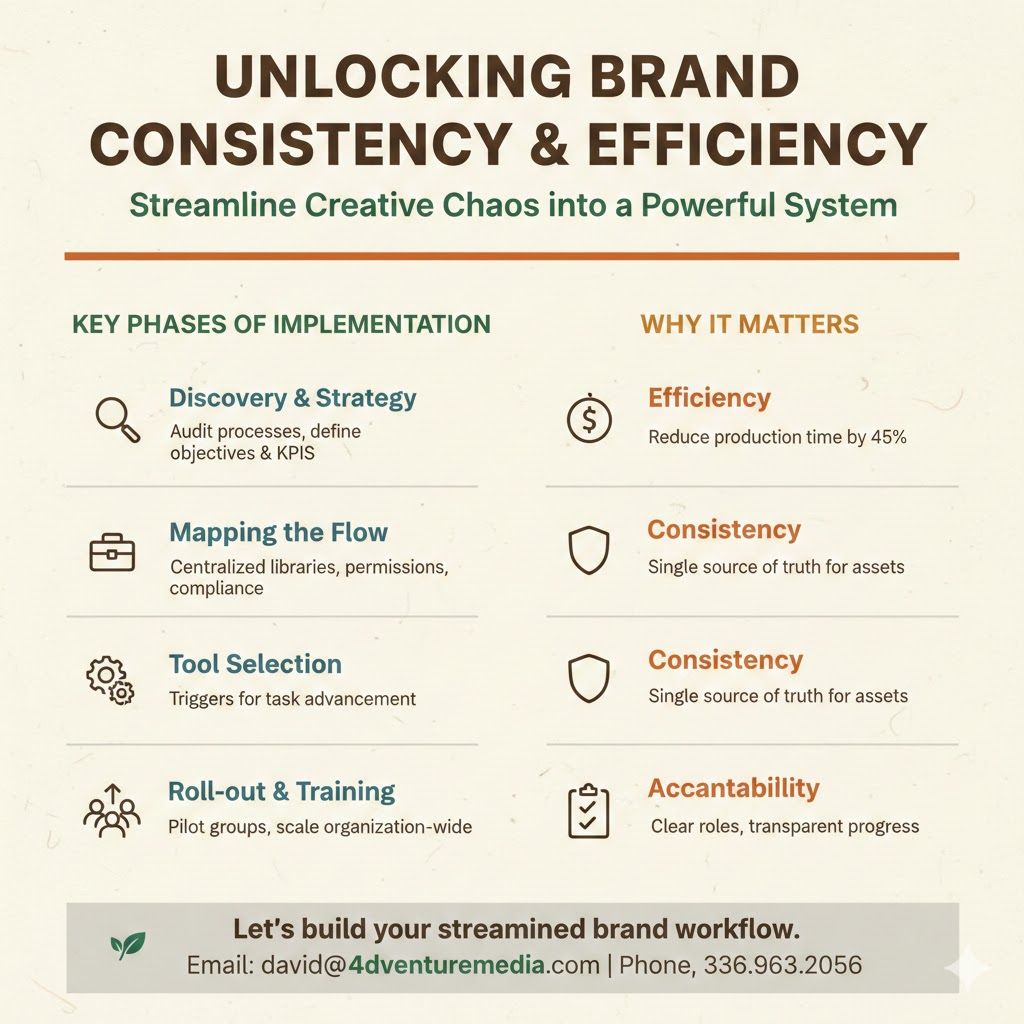
The Bottleneck: Why Your Creative Workflow is Stalling
In Central North Carolina, I see the same pattern with growing teams: a marketing director in Raleigh or a business owner in Greensboro becomes a human "bottleneck." Every time a sales rep needs a flyer or HR needs a recruiting banner, the work stops for a manual design request.
This doesn't just slow you down; it leads to "Brand Drift." Eventually, someone gets tired of waiting and makes their own version in Word using a logo they found on Google. Suddenly, your professional image is fractured.
4Adventure Media | Brand Strategy Service
The Ecosystem Decision: Tool vs. Architecture
In 2026, choosing a brand platform isn’t just about the features; it’s about where your team already lives. A tool that doesn't talk to your existing software is just another "data silo" that will eventually be ignored.
I generally categorize these platforms into two camps: Ecosystem Specialists and Agnostic Integrators.
1. The Ecosystem Specialists: "Stay Where You Are"
These tools are perfect if your company is already "all-in" on a specific software suite. The benefit here is a near-zero learning curve and seamless asset syncing.
- Adobe Express (The Creative Pro's Companion): Best for teams already using the Adobe Creative Cloud. It allows non-designers to pull in Photoshop or Illustrator files and make quick edits without needing a full license or specialized training.
- Canva (The Visual First-Responder): Ideal for those already utilizing Canva for social media or Affinity for design. Its strength is its massive internal library; if you use Canva, you rarely have to leave the ecosystem to find stock photos or music.
- Templafy (The Microsoft Enterprise Standard): If your business runs on Outlook, Word, and PowerPoint, Templafy is the gold standard. It lives inside the Microsoft Office ribbon, ensuring that every document created is automatically compliant with legal and brand standards.
2. The Agnostic Integrators: "Connect Everything"
If your tech stack is a "best-of-breed" mix (e.g., you use Slack for chat, Figma for design, and Salesforce for CRM), you need a platform that acts as a bridge rather than a walled garden.
- Marq & Frontify: These stand out for their ability to pull assets from multiple sources. Frontify, for example, can sync with Figma and Adobe simultaneously, acting as the "single source of truth" for the whole company.
- Chili Publish & Bynder: These are high-performance engines built to sit in the middle of complex workflows. Bynder isn't trying to be your design tool; it's trying to be the Asset Powerhouse that feeds into every other program you own, from WordPress to your social media schedulers.
Top Brand Management Platforms & What They Do
1. Marq
- Use Case: Distributed teams needing centralized brand control.
- Core Features: Template governance with role-based access, centralized brand kits, smart templates for automated data merging, self-service portals for multiple teams.
- Pricing: $10/month (Pro), Team $10/user/month, Enterprise custom.
- Strengths: Supports multi-location content creation, compliance-ready for regulated industries, integrates with CRMs and DAMs.
- Limitations: May be overkill for small teams; not designed for pixel-level original design.
- Style Note: Show dashboard with locked template zones, multi-brand portal view.
2. Canva
- Use Case: Solo marketers or small creative teams seeking speed and flexibility.
- Core Features: Brand kits, large template library, drag-and-drop editor, role-based permissions (Enterprise tier).
- Pricing: Free, Pro $15/month, Business $20/month/user, Enterprise custom.
- Strengths: Easy to use, huge library of ready-made templates, mobile-friendly.
- Limitations: Advanced brand controls require Enterprise tier; scaling costs can rise quickly.
- Style Note: Visual mockup of a social post template in Canva with brand kit applied.
3. Adobe Express
- Use Case: Teams already using Adobe Creative Cloud.
- Core Features: Shared templates, Creative Cloud Libraries integration, mobile editing app.
- Pricing: Free, Teams $7.99/month/user, Premium $9.99/month, Enterprise custom.
- Strengths: Familiar Adobe interface, integrates seamlessly with Creative Cloud assets.
- Limitations: Limited integrations outside Adobe, multi-brand management is complex.
- Style Note: Show Creative Cloud Libraries panel with shared assets.
4. Templafy
- Use Case: Microsoft-centric enterprises needing document compliance.
- Core Features: Role-based permissions, automated compliance text, document governance tracking.
- Pricing: Custom per plan.
- Strengths: Enterprise-ready, strong audit trails, automates legal and regulatory text.
- Limitations: Only supports Microsoft documents, implementation requires training.
- Style Note: Example workflow showing Word or PowerPoint template with compliance automation highlighted.
5. Frontify
- Use Case: Teams needing a centralized brand portal.
- Core Features: Stores logos, templates, and brand guidelines; localizes Figma, InDesign, and Sketch templates.
- Pricing: Custom, based on monthly active users.
- Strengths: Organized brand library, good for localization.
- Limitations: Limited high-volume automation.
- Style Note: Visual of brand portal homepage with asset tiles.
6. Chili Publish
- Use Case: High-volume content production for multi-channel campaigns.
- Core Features: Creative automation, template personalization at scale.
- Pricing: Starts $875/month + add-ons.
- Strengths: Handles large-scale personalization and complex campaigns.
- Limitations: Steep learning curve, less intuitive than simpler platforms.
- Style Note: Graphic showing automated template population for multiple channels.
7. Bynder
- Use Case: Teams needing robust digital asset management (DAM).
- Core Features: Centralized asset storage, metadata tagging, permissions.
- Pricing: Custom.
- Strengths: Excellent for storing and organizing assets, structured libraries.
- Limitations: Does not create content, complementary to content creation tools.
- Style Note: Example of DAM folder structure with metadata tags visible.


Choosing the Right Platform
Governance & Compliance
Role-based access, approval workflows, and locked templates help maintain brand standards while reducing review cycles. For regulated industries in North Carolina, these controls support both efficiency and legal compliance.
Scalability
Platforms that support distributed teams with self-service portals allow multiple contributors to create content without creating bottlenecks.
Automation & Efficiency
Automation features, like smart templates and dynamic data fields, reduce repetitive tasks and keep content consistent across assets. Connecting these systems to internal data sources allows real-time updates.
FAQ
What is brand management software used for?
It centralizes templates, assets, and governance controls to maintain consistent brand messaging across teams. NC businesses can use these tools to reduce errors and save time while scaling marketing efforts.
How do I choose the right platform for my team?
Identify team size, workflow complexity, compliance needs, and creative flexibility requirements. Map these to platform features to ensure both efficiency and brand consistency.
Can small businesses benefit from brand management tools?
Yes. Even small teams can use templates, role-based access, and automation to streamline design tasks. Choosing a platform that scales avoids manual rework as the business grows.
Do these platforms integrate with other tools?
Most modern platforms integrate with CRMs, DAMs, Adobe, or Microsoft 365. Integration ensures that brand updates and content distribution remain consistent across systems.
Brand management software doesn’t just store your assets—it enables your team to create, scale, and maintain brand consistency efficiently. Start by testing 2–3 platforms with free trials or sandbox environments to see which workflows align with your team.
Not sure where to start? Let’s figure it out together.
Moving from where you are to where you need to be requires a strategy built for your unique needs. If you have questions about applying these concepts to your specific business, I’m just a message away—you can reach me directly at david@4adventuremedia.com or by calling or texting 336.963.2056 for a personalized consultation.
Get in Touch — Let’s start the conversation today.
Field Notes & Insights
By David Cox
Owner, 4Adventure Media
With over 12 years of experience in visual media, I am driven by a passion for solving complex problems and helping clients reach their most ambitious goals.
May 4th, 2026
Why Asheboro Contractors Lose High-Ticket Bids to "Scruffy" Competition
Website Conversion, Contractor Branding, Local Business Marketing, Visual Trust, Central North Carolina

March 25th, 2026
Why Homeowners Ghost Your Estimates | Asheboro NC
Website Conversion, Construction Marketing, Contractor Branding, Local Business Marketing, Visual Trust

March 23rd, 2026
